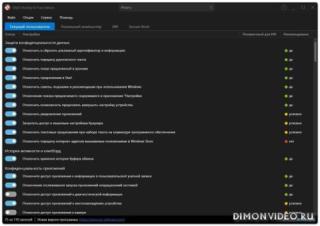
Антишпионский инструмент для самостоятельного решения, какие “удобные” функции Windows угрожают конфиденциальности и должны быть отключены.
- Настройка параметров безопасности.
- Защита конфиденциальности данных.
- Управление службами определения местоположения.
- Управление обновлениями Windows.
- Предотвращение передачи пользовательских и диагностических данных.
Разработчик: O&O Software
Интерфейс: многоязычный + русский
Состояние: бесплатная версия
Платформа: Windows 10 и новее
O&O ShutUp10++ v.3.2.1111 x64 (70.60 Mb)
O&O ShutUp10++ v.3.2.1111 arm64 (66.61 Mb)
Список изменений:
Added
Disable Click to Do (C208)
Disable the Settings agent (C209)
Disable AI features in Notepad (C210)
Disable AI actions in File Explorer (C211)
Disable Find My Device (L008)
Disable Microsoft account cloud content search (M029)
Disable work or school cloud content search (M030)
Disable device search history (M031)
Disable Start menu recommendations for tips, shortcuts and new apps (M032)
Disable Start menu account notifications (M033)
Disable Settings app account notifications (M034)
Disable extension of Windows search with Bing (M103)
Deny app access to generative AI (P082)
Deny app access to generative AI (P083)
Deny app access to presence sensing (P084)
Deny app access to presence sensing (P085)
Do not send device name in diagnostic data (U008)
Windows Insider Program conflict detection: when the PC is enrolled in the Windows Insider Program, a notice explains that certain diagnostic-data settings prevent participation, and a dialog offers to disable those settings
Improved
Settings that do not apply to the installed Windows edition (e.g. certain Cortana settings) are no longer applied
Fixed
Fixed an issue where displaying the Secure Boot certificate status could briefly freeze the user interface
PREM: The main window could no longer be displayed after being maximized and then minimized or closed to the tray
PREM: With autostart enabled, an empty black window could appear in the Alt-Tab switcher after Windows sign-in that could not be clicked or opened (the application kept running correctly in the system tray). The cause was restoring the saved window position at startup, which pulled the hidden, minimized startup window back out of its minimized state so it was not hidden cleanly




 (Администратор) Реп.



Обновление от 16/07/2026 17:04:34
============
Причина редактирования: новая версия
0 ответить