



 (Администратор) Реп.
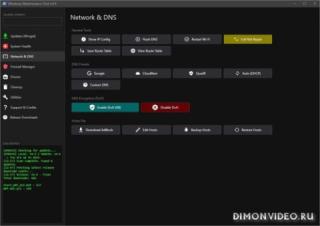
Утилита написанная на PowerShell, с открытым исходным кодом, для обслуживания и оптимизации Windows.
Идеалена для системных администраторов, инженеров поддержки и опытных пользователей.

Средства восстановления:
- Быстрый доступ к SFC, DISM и CHKDSK
Управление обновлениями и пакетами:
• Установка, обновление и восстановление системных пакетов через winget.
• Автоматическая установка winget, если отсутствует.
• Поиск, просмотр и обновление приложений по ID напрямую.
• Инструмент восстановления Windows Update с расширенными режимами «полного сброса и восстановления».
Оптимизация дисков:
• TRIM и оптимизированная дефрагментация для SSD и HDD.
Сеть и диагностика:
• Работа с ipconfig, просмотр таблицы маршрутизации, настройка DNS.
• Сброс сетевых адаптеров и устранение проблем соединения.
• DNS-Adblock: блокировка рекламы и трекеров через hosts, зеркала для скачивания, резервное копирование и восстановление.
Очистка и приватность:
• Очистка временных файлов, логов и корзины.
• Очистка приватных данных (история, cookies и др.)
• Интеграция с Winapp2 и Winget.
Работа с реестром:
• Безопасная очистка, проверка на повреждения
• Список «безопасных для удаления» ключей (IE40, IE4Data, DirectDrawEx и др.)
• Массовое удаление ненужных ключей.
• Автоматические резервные копии в .reg файлы.
Безопасность:
• Менеджер брандмауэра на PowerShell: управление правилами, включение/выключение Windows Firewall.
• Обход ограничений Group Policy для запуска неподписанных PowerShell-скриптов.
Дополнительные инструменты:
• Настройки .NET RollForward (выбор версии SDK/Runtime без установки всех сборок)
• Shortcut Fixer — автоматическое восстановление ярлыков.
• Просмотр и управление всеми задачами Windows через меню PowerShell.
• Прямой ввод ID в меню для ускоренной работы.
• Переработанное меню: опции упорядочены, больше вариантов возврата, горячие клавиши для справки и поддержки (Discord/GitHub)
Отчёты и сохранение данных:
• Все результаты сохраняются в выбранную папку (по умолчанию — DesktopSystemReports):
• System_Info_YYYY-MM-DD.txt — системная информация.
• Network_Info_YYYY-MM-DD.txt — настройки сети.
• Driver_List_YYYY-MM-DD.txt — список драйверов.
• Routing_table_YYYY-MM-DD.txt — таблица маршрутизации.
• RegistryBackup_YYYY-MM-DD_HH-MM.reg — резервные копии реестра.
Как работает:
• Запустите .bat от имени Aдминистратора
• Следуйте меню на экране.
Примечание:
• Скрипт можно запускать с любого места.
• Интернет нужен только для опциональных функций (winget и т.п.)
- Быстрый доступ к SFC, DISM и CHKDSK
Управление обновлениями и пакетами:
• Установка, обновление и восстановление системных пакетов через winget.
• Автоматическая установка winget, если отсутствует.
• Поиск, просмотр и обновление приложений по ID напрямую.
• Инструмент восстановления Windows Update с расширенными режимами «полного сброса и восстановления».
Оптимизация дисков:
• TRIM и оптимизированная дефрагментация для SSD и HDD.
Сеть и диагностика:
• Работа с ipconfig, просмотр таблицы маршрутизации, настройка DNS.
• Сброс сетевых адаптеров и устранение проблем соединения.
• DNS-Adblock: блокировка рекламы и трекеров через hosts, зеркала для скачивания, резервное копирование и восстановление.
Очистка и приватность:
• Очистка временных файлов, логов и корзины.
• Очистка приватных данных (история, cookies и др.)
• Интеграция с Winapp2 и Winget.
Работа с реестром:
• Безопасная очистка, проверка на повреждения
• Список «безопасных для удаления» ключей (IE40, IE4Data, DirectDrawEx и др.)
• Массовое удаление ненужных ключей.
• Автоматические резервные копии в .reg файлы.
Безопасность:
• Менеджер брандмауэра на PowerShell: управление правилами, включение/выключение Windows Firewall.
• Обход ограничений Group Policy для запуска неподписанных PowerShell-скриптов.
Дополнительные инструменты:
• Настройки .NET RollForward (выбор версии SDK/Runtime без установки всех сборок)
• Shortcut Fixer — автоматическое восстановление ярлыков.
• Просмотр и управление всеми задачами Windows через меню PowerShell.
• Прямой ввод ID в меню для ускоренной работы.
• Переработанное меню: опции упорядочены, больше вариантов возврата, горячие клавиши для справки и поддержки (Discord/GitHub)
Отчёты и сохранение данных:
• Все результаты сохраняются в выбранную папку (по умолчанию — DesktopSystemReports):
• System_Info_YYYY-MM-DD.txt — системная информация.
• Network_Info_YYYY-MM-DD.txt — настройки сети.
• Driver_List_YYYY-MM-DD.txt — список драйверов.
• Routing_table_YYYY-MM-DD.txt — таблица маршрутизации.
• RegistryBackup_YYYY-MM-DD_HH-MM.reg — резервные копии реестра.
Как работает:
• Запустите .bat от имени Aдминистратора
• Следуйте меню на экране.
Примечание:
• Скрипт можно запускать с любого места.
• Интернет нужен только для опциональных функций (winget и т.п.)
Разработчик: Lil Batti
Интерфейс: английский
Состояние: бесплатно
Платформа: Windows 10 и новее
Список изменений:
Added
Added persistent Background Jobs and Update Scans controls in Support & Credits for troubleshooting automatic My Device, Tweaks, tray, and package-scan activity.
Added a Tweaks loading overlay that blocks interaction until the initial state cache is ready, preventing early clicks from using incomplete/default state data.
Added Windows-version support detection for 3D Objects, Chat, Widgets, Activity History, CEIP, and Online Speech. Unsupported controls are disabled and display an explanation.
Added progress and status feedback while Windows Event Logs are being cleared.
Added a removable AppX package loader that uses Get-AppxPackage and falls back to DISM when the AppX cmdlets are unavailable.
Added a shared New-WmtPooledPowerShell helper so isolated background work consistently uses WMT's configured runspace pool.
Changed
Updated WMT-GUI.ps1 app version to 6.4.
Changed View Services on the Tweaks page to open the existing Startup Manager directly on its Services tab.
Reworked tweak refresh behavior so 115 of 122 handlers update only the affected button. The seven multi-control actions retain a full state refresh.
Changed mouse speed and Enhanced Pointer Precision changes to native SystemParametersInfo calls so they update the live Windows state immediately.
Improved mouse-acceleration state detection by checking MouseSpeed, MouseThreshold1, and MouseThreshold2 together.
Reworked numerous provider, package, My Device, Tweaks, and registry jobs to use the shared PowerShell runspace pool.
Improved runspace compatibility by supplying required registry-path conversion and helper functions inside pooled workers.
Improved native-command output handling with explicit OEM/UTF-8 encoding per runspace where appropriate.
Replaced all three powershell.exe -EncodedCommand launchers used by CHKDSK, SSD Trim, and Quick Fix with temporary .ps1 files launched through -File, reducing antivirus false positives.
Added null guards to more than 30 event handlers across Firewall, Drivers, Cleanup, global search, Utilities, and system-tool controls.
Hardened Set-WmtRegDword and Set-WmtRegString so protected or inaccessible registry values do not produce unhandled errors.
Added error handling and themed failure dialogs to Firewall enable, disable, and delete actions.
Extended the Take Ownership context-menu tweak to files, folders, and drives.
Replaced more raw Windows message boxes with WMT's themed, owner-aware message-box helper.
Improved NVIDIA quick actions by opening the newer NVIDIA App when NVIDIA Control Panel is unavailable.
Removed redundant control assignments and the unused Test-WmtDirectoryHasEntries, New-WmtVirtualRows, and Show-AdvancedCleanupSelection functions.
Fixed
Fixed the View Services crash reported in issue #141.
Fixed mouse acceleration being shown as enabled when the threshold values indicated that Enhanced Pointer Precision was actually disabled.
Fixed mouse speed and acceleration buttons changing registry values without reliably changing the live pointer behavior.
Fixed tweak buttons becoming no-ops or showing the wrong state when clicked before the background cache had finished loading.
Fixed 16 tweak controls accumulating duplicate click handlers every time all tweak states were refreshed.
Fixed My Device sections failing to gather information after helper functions were not reliably imported into pooled runspaces.
Fixed optional Windows-feature states failing to load correctly in the background worker.
Fixed the Event Log cleaner and moved its work off the UI thread with visible progress feedback.
Fixed the AppX list failing to populate correctly and ensured removal actions use each package's full package name.
Fixed registry cleanup workers missing registry-path conversion support when executed through the pooled runner.
Fixed obsolete-uninstaller cleanup emitting avoidable errors when protected registry keys cannot be removed.
Fixed fragile message-box calls that passed string values instead of strongly typed WPF button, image, and result enums.
Fixed duplicate compilation of the clock-format SendMessageTimeout native helper.
Notes
Turning Background Jobs off prevents automatic My Device and Tweaks state loading until it is enabled again.
Turning Update Scans off disables automatic, tray-triggered, and manual package scans in the current interface.
The new background controls provide troubleshooting options related to issue #143; the broader Windows 25H2 report remains open..
Added persistent Background Jobs and Update Scans controls in Support & Credits for troubleshooting automatic My Device, Tweaks, tray, and package-scan activity.
Added a Tweaks loading overlay that blocks interaction until the initial state cache is ready, preventing early clicks from using incomplete/default state data.
Added Windows-version support detection for 3D Objects, Chat, Widgets, Activity History, CEIP, and Online Speech. Unsupported controls are disabled and display an explanation.
Added progress and status feedback while Windows Event Logs are being cleared.
Added a removable AppX package loader that uses Get-AppxPackage and falls back to DISM when the AppX cmdlets are unavailable.
Added a shared New-WmtPooledPowerShell helper so isolated background work consistently uses WMT's configured runspace pool.
Changed
Updated WMT-GUI.ps1 app version to 6.4.
Changed View Services on the Tweaks page to open the existing Startup Manager directly on its Services tab.
Reworked tweak refresh behavior so 115 of 122 handlers update only the affected button. The seven multi-control actions retain a full state refresh.
Changed mouse speed and Enhanced Pointer Precision changes to native SystemParametersInfo calls so they update the live Windows state immediately.
Improved mouse-acceleration state detection by checking MouseSpeed, MouseThreshold1, and MouseThreshold2 together.
Reworked numerous provider, package, My Device, Tweaks, and registry jobs to use the shared PowerShell runspace pool.
Improved runspace compatibility by supplying required registry-path conversion and helper functions inside pooled workers.
Improved native-command output handling with explicit OEM/UTF-8 encoding per runspace where appropriate.
Replaced all three powershell.exe -EncodedCommand launchers used by CHKDSK, SSD Trim, and Quick Fix with temporary .ps1 files launched through -File, reducing antivirus false positives.
Added null guards to more than 30 event handlers across Firewall, Drivers, Cleanup, global search, Utilities, and system-tool controls.
Hardened Set-WmtRegDword and Set-WmtRegString so protected or inaccessible registry values do not produce unhandled errors.
Added error handling and themed failure dialogs to Firewall enable, disable, and delete actions.
Extended the Take Ownership context-menu tweak to files, folders, and drives.
Replaced more raw Windows message boxes with WMT's themed, owner-aware message-box helper.
Improved NVIDIA quick actions by opening the newer NVIDIA App when NVIDIA Control Panel is unavailable.
Removed redundant control assignments and the unused Test-WmtDirectoryHasEntries, New-WmtVirtualRows, and Show-AdvancedCleanupSelection functions.
Fixed
Fixed the View Services crash reported in issue #141.
Fixed mouse acceleration being shown as enabled when the threshold values indicated that Enhanced Pointer Precision was actually disabled.
Fixed mouse speed and acceleration buttons changing registry values without reliably changing the live pointer behavior.
Fixed tweak buttons becoming no-ops or showing the wrong state when clicked before the background cache had finished loading.
Fixed 16 tweak controls accumulating duplicate click handlers every time all tweak states were refreshed.
Fixed My Device sections failing to gather information after helper functions were not reliably imported into pooled runspaces.
Fixed optional Windows-feature states failing to load correctly in the background worker.
Fixed the Event Log cleaner and moved its work off the UI thread with visible progress feedback.
Fixed the AppX list failing to populate correctly and ensured removal actions use each package's full package name.
Fixed registry cleanup workers missing registry-path conversion support when executed through the pooled runner.
Fixed obsolete-uninstaller cleanup emitting avoidable errors when protected registry keys cannot be removed.
Fixed fragile message-box calls that passed string values instead of strongly typed WPF button, image, and result enums.
Fixed duplicate compilation of the clock-format SendMessageTimeout native helper.
Notes
Turning Background Jobs off prevents automatic My Device and Tweaks state loading until it is enabled again.
Turning Update Scans off disables automatic, tray-triggered, and manual package scans in the current interface.
The new background controls provide troubleshooting options related to issue #143; the broader Windows 25H2 report remains open..

Обновление от 05/08/2026 18:43:10
============
Причина редактирования: новая версия
0 ответить