



 (Администратор) Реп.
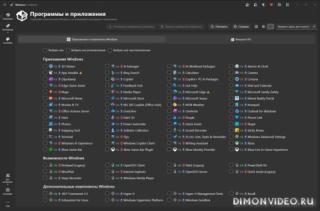
Приложение для упрощения, оптимизации и настройки работы с Windows: от управления программным обеспечением до оптимизации и настройки системы.

Программное обеспечение и приложения:
- Раздел «Приложения и возможности Windows»
- Интерфейс с возможностью поиска и пояснительной легендой.
- Разделы структурированны по категориям: приложения Windows, устаревшие возможности и дополнительные функции.
- Удаление и установка выбранных элементов одним щелчком мыши.
- Управление скриптами и запланированными задачами через меню «Справка» приложений Windows.
- Установка различных полезных приложений через WinGet (в категорию входят браузеры, мультимедийные утилиты, программы для просмотра документов и многое другое).
Оптимизация:
- Удобный интерфейс с функцией поиска и быстрой навигацией.
- Переключатели и элементы управления выбором для каждой настройки.
- Установка уровеня уведомлений UAC.
- Настройки конфиденциальности.
- Оптимизация игр и производительности.
- Управление обновлениями Windows.
- Настройки питания с выбором плана электропитания.
- Настройки звука и уведомлений.
Настройки:
- Удобный интерфейс с функцией поиска и быстрой навигацией.
- Переключатели и элементы управления выбором для каждой настройки.
- Выбор темы оформления Windows (темный или светлый режим)
- Настройка панели задач, меню «Пуск» и Проводника.
Расширенные инструменты:
- Создание пользовательских ISO-образов Windows с помощью WIMUtil (утилита для установки Windows), включая добавление драйверов из текущей ОС.
- Создание файла autounattend.xml на основе выбранных вами параметров в Winhance.
Другие настройки:
- Управление настройками Winhance (а так же Windows) с помощью конфигурационных файлов.
- Сохранение текущих настроек, применяемых Winhance в конфигурационный файл, для удобного импорта в новую систему или после чистой установки Windows.
- Переключение темы оформления Winhance (светлый или темный режим) и т.д.
- Раздел «Приложения и возможности Windows»
- Интерфейс с возможностью поиска и пояснительной легендой.
- Разделы структурированны по категориям: приложения Windows, устаревшие возможности и дополнительные функции.
- Удаление и установка выбранных элементов одним щелчком мыши.
- Управление скриптами и запланированными задачами через меню «Справка» приложений Windows.
- Установка различных полезных приложений через WinGet (в категорию входят браузеры, мультимедийные утилиты, программы для просмотра документов и многое другое).
Оптимизация:
- Удобный интерфейс с функцией поиска и быстрой навигацией.
- Переключатели и элементы управления выбором для каждой настройки.
- Установка уровеня уведомлений UAC.
- Настройки конфиденциальности.
- Оптимизация игр и производительности.
- Управление обновлениями Windows.
- Настройки питания с выбором плана электропитания.
- Настройки звука и уведомлений.
Настройки:
- Удобный интерфейс с функцией поиска и быстрой навигацией.
- Переключатели и элементы управления выбором для каждой настройки.
- Выбор темы оформления Windows (темный или светлый режим)
- Настройка панели задач, меню «Пуск» и Проводника.
Расширенные инструменты:
- Создание пользовательских ISO-образов Windows с помощью WIMUtil (утилита для установки Windows), включая добавление драйверов из текущей ОС.
- Создание файла autounattend.xml на основе выбранных вами параметров в Winhance.
Другие настройки:
- Управление настройками Winhance (а так же Windows) с помощью конфигурационных файлов.
- Сохранение текущих настроек, применяемых Winhance в конфигурационный файл, для удобного импорта в новую систему или после чистой установки Windows.
- Переключение темы оформления Winhance (светлый или темный режим) и т.д.
Разработчик: Marco du Plessis
Интерфейс: многоязычный + русский
Состояние: бесплатно
Платформа: Windows 10 x64 и новее
Список изменений:
Features
Builder Mode — build a Winhance config file or autounattend.xml without changing anything on the PC you're sitting at. Flip the new mode switcher to Builder, set everything the way you want it, and save the result as a Winhance config or an autounattend file ready for deployment on other machines.
Sponsors & Supporters page — the exit donation dialog is gone. In its place, an in-app page (heart icon or the More menu) recognizes the businesses and individual supporters who keep Winhance free. It works offline and is fully localized.
Change History — Winhance now keeps a receipt of everything it does. ChangeHistory.txt records every setting change (before and after values) and every app install or removal, with clear headers for config imports and bulk actions. Open it from the More menu.
Hebrew language support — Winhance is now available in 29 languages.
New Explorer customizations: desktop icon visibility toggles, This PC folder visibility, an icon cache size setting, and automatic thumbnail cache cleanup.
New "All apps view" setting for the redesigned Windows 11 Start menu, and the Windows 11 system tray icons setting is now a dropdown with more control.
App-local UI zoom — press Ctrl +/-/0 or use Ctrl+MouseWheel to scale the whole app, just like a browser.
New External Apps: EA app, Ubisoft Connect, Battle.net, Rockstar Games Launcher, PowerShell, and Helium Browser.
Bug Fixes
Layouts no longer clip when the Windows text size slider is set above 100%.
Accessibility: Narrator now announces setting names on toggles and dropdowns, previously unlabeled buttons are labeled, and progress updates are announced.
Silent updates now respect your custom install location instead of reverting to the default.
Cancel in Review Mode no longer clears your app selections.
OneNote is now detected correctly for Win32 Click-to-Run installs.
Clean Start Menu applies more reliably by also writing the group policy path.
WinGet errors are no longer silent — error details now show in the terminal output.
Fixed a startup crash on older Windows builds caused by a .NET runtime regression.
Config import now converts power setting values correctly and no longer re-applies an already-active power plan.
Improvements
App icons load noticeably faster and cover almost everything now, including legacy capabilities and optional features — they come from a dedicated, checksum-validated icon repository and are fetched in parallel.
Software & Apps polish: per-icon tooltips, extra table columns, an app sort dropdown, relocated search, and a cleaner compact view.
A warning now appears when the Connected Devices Platform Service is set to Manual or Disabled, since some Windows features depend on it.
Builder Mode — build a Winhance config file or autounattend.xml without changing anything on the PC you're sitting at. Flip the new mode switcher to Builder, set everything the way you want it, and save the result as a Winhance config or an autounattend file ready for deployment on other machines.
Sponsors & Supporters page — the exit donation dialog is gone. In its place, an in-app page (heart icon or the More menu) recognizes the businesses and individual supporters who keep Winhance free. It works offline and is fully localized.
Change History — Winhance now keeps a receipt of everything it does. ChangeHistory.txt records every setting change (before and after values) and every app install or removal, with clear headers for config imports and bulk actions. Open it from the More menu.
Hebrew language support — Winhance is now available in 29 languages.
New Explorer customizations: desktop icon visibility toggles, This PC folder visibility, an icon cache size setting, and automatic thumbnail cache cleanup.
New "All apps view" setting for the redesigned Windows 11 Start menu, and the Windows 11 system tray icons setting is now a dropdown with more control.
App-local UI zoom — press Ctrl +/-/0 or use Ctrl+MouseWheel to scale the whole app, just like a browser.
New External Apps: EA app, Ubisoft Connect, Battle.net, Rockstar Games Launcher, PowerShell, and Helium Browser.
Bug Fixes
Layouts no longer clip when the Windows text size slider is set above 100%.
Accessibility: Narrator now announces setting names on toggles and dropdowns, previously unlabeled buttons are labeled, and progress updates are announced.
Silent updates now respect your custom install location instead of reverting to the default.
Cancel in Review Mode no longer clears your app selections.
OneNote is now detected correctly for Win32 Click-to-Run installs.
Clean Start Menu applies more reliably by also writing the group policy path.
WinGet errors are no longer silent — error details now show in the terminal output.
Fixed a startup crash on older Windows builds caused by a .NET runtime regression.
Config import now converts power setting values correctly and no longer re-applies an already-active power plan.
Improvements
App icons load noticeably faster and cover almost everything now, including legacy capabilities and optional features — they come from a dedicated, checksum-validated icon repository and are fetched in parallel.
Software & Apps polish: per-icon tooltips, extra table columns, an app sort dropdown, relocated search, and a cleaner compact view.
A warning now appears when the Connected Devices Platform Service is set to Manual or Disabled, since some Windows features depend on it.

Обновление от 28/06/2026 11:32:20
============
Причина редактирования: новая версия
0 ответить